Did you know that you can show who liked you on Facebook with a simple widget called the "like box?" Unfortunately, this is only available for Facebook Pages, which really sucks. All you need to do is enter some data at http://developers.facebook.com/docs/reference/plugins/like-box/ and click get code. Make sure the FB Javascript SDK is included:
<div id="fb-root"></div>
<script>(function(d, s, id) {
var js, fjs = d.getElementsByTagName(s)[0];
if (d.getElementById(id)) return;
js = d.createElement(s); js.id = id;
js.src = "//connect.facebook.net/en_US/all.js#xfbml=1";
fjs.parentNode.insertBefore(js, fjs);
}(document, 'script', 'facebook-jssdk'));</script>
Then you have the code they generated for you:
<div class="fb-like-box" data-href="http://www.facebook.com/pages/Fireburst/269394286467409?ref=hl" data-width="292" data-show-faces="true" data-stream="true" data-header="true"></div>
I already wrote a post on HTML5 video. This expands on it and explains things like auto play.
Master Code + controls = auto play, loop
To add loop, auto play and "poster" or image that's shown when the video first loads, use this code:
<video poster="thumbnail.png" autoplay loop controls tabindex="0">
<source src="vide.webm" type="video/webm"; codecs="vp8, vorbis" />
<source src="video.mp4" type="video/mp4"; codecs="theora, vorbis" />
</video>
Replace thumbnail.png with the URL of the pic you want to display when the video is first loaded, video.webm with the URL of the webm version of your video, video.mp4 with the URL of the mp4 version of your video. The autoplay and loop controls set what they sound like: autoplay making the video play upon loading and loop making the video repeat. More on HTML5 video is available at my former post.
Desktop
| Feature | Chrome | Firefox (Gecko) | Internet Explorer | Opera | Safari |
|---|
| HTML5 video | 20.0 | 12.0 | 9.0 | 12.0 | 5.1 |
Html5 is a modern code supported by modern browsers such Opera12+ Internet Explorer 10, Mozilla Firefox 14+, Internet Explorer 10 and Google Chrome 18+. This is the video code. The video file should be Webm or mp4 for best support. If you can have your video in both file formats, that's great because then, if one browser doesn't support a file type, it will use the other. The basic code is:
<video src="videoURL"></video>
If you have mp4 and webm the master code is this:
<video>
<source src="videoURL.webm" type='video/webm; codecs="vp8, vorbis"' />
<source src="videoURL.mp4" type='video/mp4; codecs="avc1.42E01E, mp4a.40.2"' />
Sorry, you're using an outdated browser! Upgrade to a fast, free web <a href="http://opera.com">here</a>.
<video>
This is the HTML5 video code. Much more simple than you thought?
Desktop
| Feature | Chrome | Firefox (Gecko) | Internet Explorer | Opera | Safari |
|---|
| Video element | 20.0 | 12.0 | 9.0 | 12.0 | 5.1 |
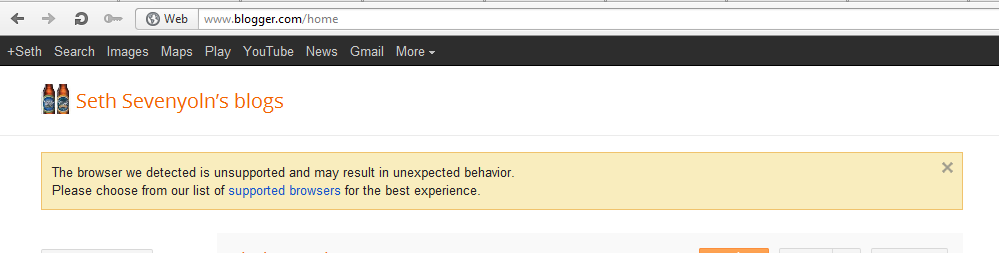
Sometimes, sites say that your Opera is not compatible. This means that you cannot use Opera to access that site. However, Opera offers a nifty way to get around this, for most sites support Opera 12 and up, even if they don't know it. And, with many Google services, you will see something like this:
So you right click on the site and it will display a menu. The second option from the bottom should be "edit site preferences". Click this and you should see something like this:
Click on "Network" and something like this should come up:
Click on the drop down menu where it says "identify as Opera and select Mask as Firefox. When you are finished you will see this:
Click "OK" and refresh the page. Do this to any page that says it is not compatible with Opera.