Showing posts with label background image. Show all posts

Thursday, November 15, 2012

Make Image Links open in a New Tab

Many people want to make image links open in a new tab, like they do on my Alternative Search Engines list. It's a fairly simple code too:
<a href="http://www.clipotech.com/" target="_blank"><img border="0" height="75" src="http://4.bp.blogspot.com/_QF2exREIx20/SVDCxpqD2jI/AAAAAAAABtg/cJuBW3wQpLw/S1600-R/0007.PNG"/></a>
That will make a link that goes like this:  
You can remove any text that's marked in red.

Tuesday, October 23, 2012

How to tell users IE is incompatible

Internet Explorer is Microsoft's web browser. It's the second most popular in the world, but unfortunately, its web standard support is extremely limited. Fortunately, its easy to tell users to upgrade. 
For IE6
IE 6 supports almost nothing, so don't be afraid to tell users to upgrade. It doesn't support Google CSE, or any advanced CSS. Here's how to tell users to upgrade IE 6. I know it says IE 7, but it won't do any warnings in IE 7. Insert this code between the <head> and </head> tags.

<!--[if lt IE 7]> <div style='border: 1px solid #F7941D; background: #FEEFDA; text-align: center; clear: both; height: 75px; position: relative;'> <div style='position: absolute; right: 3px; top: 3px; font-family: courier new; font-weight: bold;'><a href='#' onclick='javascript:this.parentNode.parentNode.style.display="none"; return false;'><img src='http://www.ie6nomore.com/files/theme/ie6nomore-cornerx.jpg' style='border: none;' alt='Close this notice'/></a></div> <div style='width: 640px; margin: 0 auto; text-align: left; padding: 0; overflow: hidden; color: black;'> <div style='width: 100px; float: left;'><img src='http://www.ie6nomore.com/files/theme/ie6nomore-warning.jpg' alt='Warning!'/></div> <div style='width: 275px; float: left; font-family: Arial, sans-serif;'> <div style='font-size: 14px; font-weight: bold; margin-top: 12px;'>You are using an outdated browser</div> <div style='font-size: 12px; margin-top: 6px; line-height: 12px;'>The browser you're using is slow, cumbersome, and outdated. <a href="http://opera.com">Click here</a> to get an up to update your browser easily or choose one of the links at right.</div> </div> <div style='width: 100px; float: left;'><a href='http://www.opera.com' target='_blank'><img src='https://blogger.googleusercontent.com/img/b/R29vZ2xl/AVvXsEjYSwsZe3Taot9flGWq3Tka26n4SiWRFTHkse5dLsk19wwCkFjJb_JfrhNAdwnnPuktxNnYz6YWGJZDRmvq49IzYfUkAVUOb8YcocPzBhg1ekHDDHnUe__bRCx58FgRzcow-ViOU2XQFvk2/s1600/opera.jpeg' style='border: none;' alt='Get Opera 12'/></a>or get <a href="http://maxthon.com">Maxthon</a> <a HREF="http://mozilla.org/firefox">Firefox</a> <a href="http://dragon.comodo.com">Comodo Dragon</a> <p><a href="http://apple.com/safari">Safari</a> <A href="http://coolnovo.com">Coolnovo</a></div> </div> </div> <![endif]-->

For All Versions of IE NOT RECOMMENDED.

Insert between the <head> and </head> tags

<!--[if lt IE 9]> <div style='border: 1px solid #F7941D; background: #FEEFDA; text-align: center; clear: both; height: 75px; position: relative;'> <div style='position: absolute; right: 3px; top: 3px; font-family: courier new; font-weight: bold;'><a href='#' onclick='javascript:this.parentNode.parentNode.style.display="none"; return false;'><img src='http://www.ie6nomore.com/files/theme/ie6nomore-cornerx.jpg' style='border: none;' alt='Close this notice'/></a></div> <div style='width: 640px; margin: 0 auto; text-align: left; padding: 0; overflow: hidden; color: black;'> <div style='width: 100px; float: left;'><img src='http://www.ie6nomore.com/files/theme/ie6nomore-warning.jpg' alt='Warning!'/></div> <div style='width: 275px; float: left; font-family: Arial, sans-serif;'> <div style='font-size: 14px; font-weight: bold; margin-top: 12px;'>You are using an outdated browser</div> <div style='font-size: 12px; margin-top: 6px; line-height: 12px;'>The browser you're using is slow, cumbersome, and outdated. <a href="http://opera.com">Click here</a> to get an up to update your browser easily or choose one of the links at right.</div> </div> <div style='width: 100px; float: left;'><a href='http://www.opera.com' target='_blank'><img src='https://blogger.googleusercontent.com/img/b/R29vZ2xl/AVvXsEjYSwsZe3Taot9flGWq3Tka26n4SiWRFTHkse5dLsk19wwCkFjJb_JfrhNAdwnnPuktxNnYz6YWGJZDRmvq49IzYfUkAVUOb8YcocPzBhg1ekHDDHnUe__bRCx58FgRzcow-ViOU2XQFvk2/s1600/opera.jpeg' style='border: none;' alt='Get Opera 12'/></a>or get <a href="http://maxthon.com">Maxthon</a> <a HREF="http://mozilla.org/firefox">Firefox</a> <a href="http://dragon.comodo.com">Comodo Dragon</a> <p><a href="http://apple.com/safari">Safari</a> <A href="http://coolnovo.com">Coolnovo</a></div> </div> </div> <![endif]-->

Monday, October 22, 2012

CSS Stylesheets or Syncing Webpages Easily

Css was made to save time. If you have a site where you want all the background colors, links, text, link hover colors and stuff like that to be the same on all pages, CSS stylesheets are the quickest way to do that. In fact, CSS stands for Cascading Style Sheets. 
1. Open notepad or any plain-text editor. Enter this code: Highlighted text is for you to change.
h3
{
 color:black;
text-align:left;
font-size:8pt;
}


Now for the Background. Remember, multiple styles cascade into one style.

body {background-color:#FFFFFF;}

You could also use an image background. This is for positioning an image in the top right corner.:
body
{
 background-image:url('image_URL');
background-repeat:no-repeat;
back
ground-position:right top;
}


If you want the image to repeat the whole length of the page:
body
{
 background-image:url('image_URL.png');
background-repeat:repeat-x;
}


Save as "Stylesheet.css"
2.Adding the style sheet to webpages. Insert this code between the <head> AND </HEAD> tags. This is where the <TITLE> tag is. 

<link rel="stylesheet" type="text/css" href="stylesheet.css" />

Monday, September 24, 2012

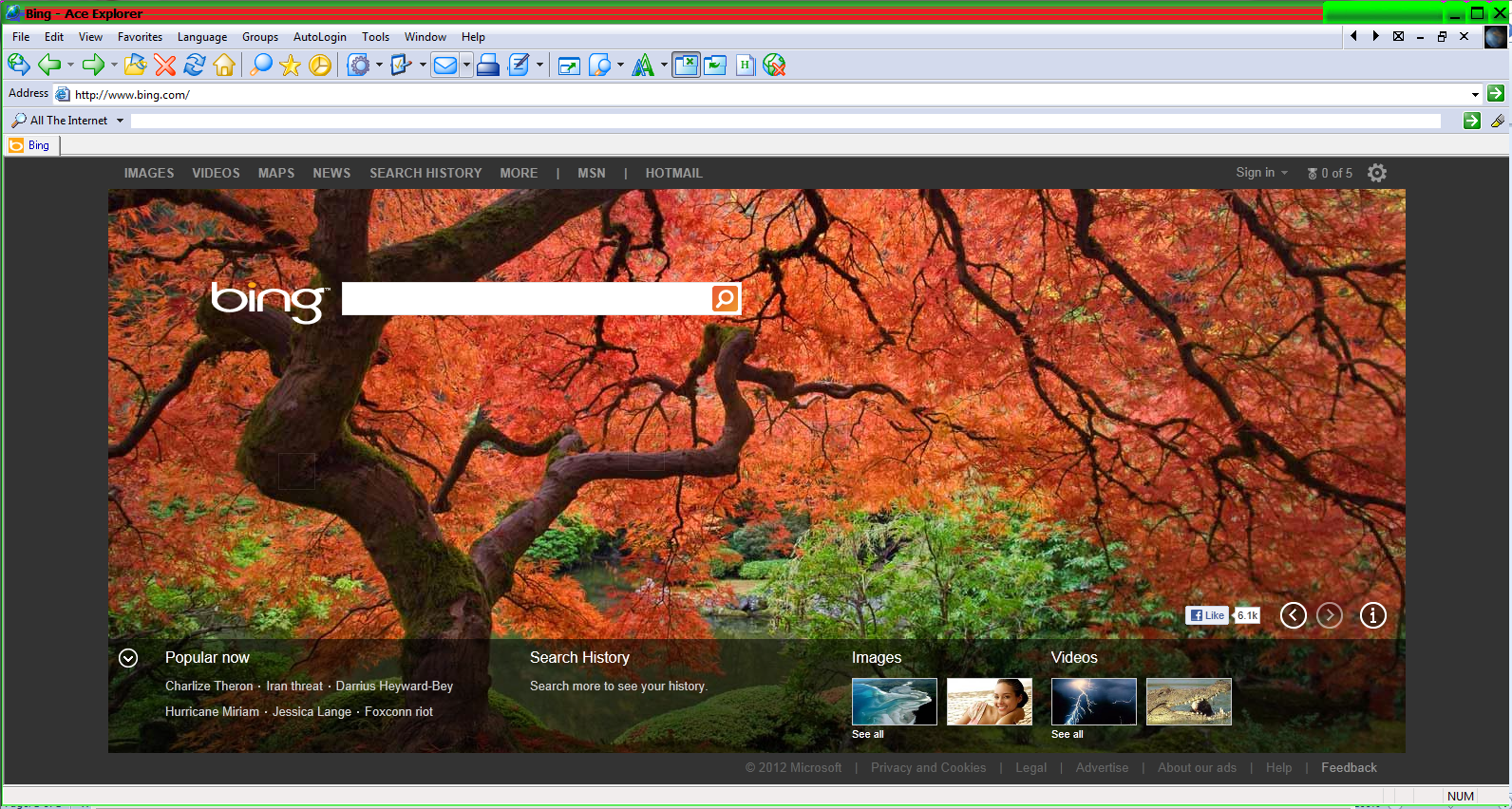
How to creat a custom Ace Explorer theme

Ace Explorer is a free browser with lots of great functionalities. Unfortunately, for those who like to customize their browsers look and feel, there are no themes. In this tutorial we will do a simple hack so as to customize Ace a little. There is no coding involved. 
Right click the ace Explorer icon and select "properties". 

Launch Windows Explorer and navigate to "C:\Program Files (x86)\Ace Explorer"

Then open the "skins" folder. Select the skin you want to edit, say in this case "green."
 

You may edit the images, but DO NOT TOUCH THE OTHER FILES.
Mine looked like this in the end: